Free · Windows · WoW Forever & TBC Anniversary
Get DanQna Journal
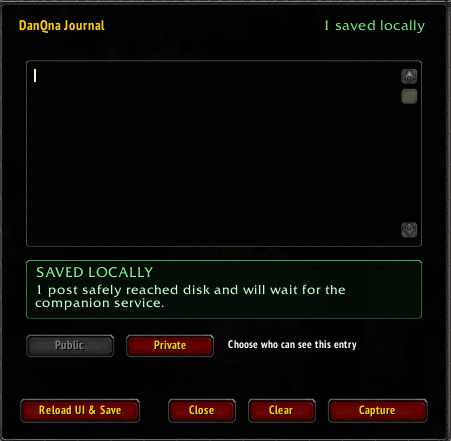
Write journal entries in World of Warcraft with a clean screenshot, and have them appear on your journal page. It works with WoW Forever and TBC Anniversary, and one download sets up everything.
- Version
- 0.2.3
- Works with
- Windows 10 and 11, 64-bit
- Size
- 69 MB
- SHA-256
52fe0c03eb89f52b6ef3ceceada44545e87c0562b098707ff1a5cbf2b43eb05f
What you get
Write in the game. Read it on the web.
Three steps
From download to your first entry
-
Make your account
Register here and click the link in the email we send you. If it doesn't arrive, check your junk or spam folder.
-
Run the download
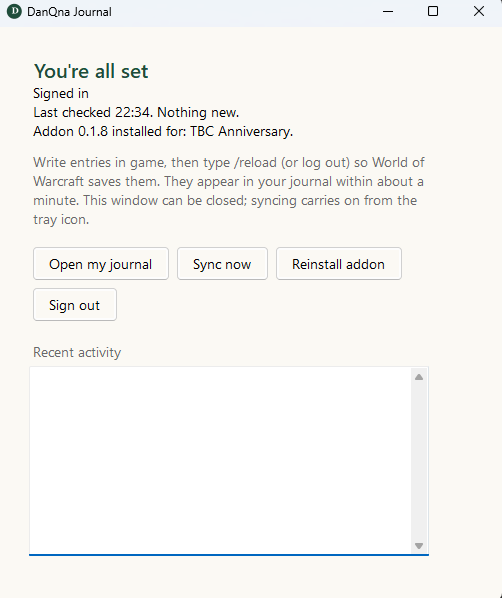
Open DanQna-Setup.exe, sign in with the same email and password, and press Sign in and install. It finds World of Warcraft, installs the addon, switches screenshots to the format the website needs, and starts quietly with Windows. You don't need to copy files or type commands.
Windows may say it "protected your PC" because the program isn't code-signed yet. Choose More info then Run anyway, but only if you downloaded it from this page.
-
Write your first entry
Start World of Warcraft, click the book beside the minimap (or type
/dq), write an entry and save it. Type/reloadafterwards so the game saves it. It shows up in your journal within a minute or so.
Good to know
- A small green "D" appears near your clock. That means it's working. Click it to see what's happening, or right-click it for options, including turning off start-up and uninstalling.
- If the game is open during setup, restart it afterwards so it loads the addon.
- Something not working? Open DanQna Journal from the Start menu and read the Recent activity box, or press Sync now. If you contact us, tell us what it says.
- To remove it, right-click the green "D" and choose Uninstall, or use Windows Settings → Apps.
Your entries, email address, and screenshots are stored encrypted on our server, and private entries are visible only to you.
Source-visible, not redistributable
Free to use. Downloaded here.
You may inspect the complete source, install it, back it up, and modify your own copy. Uploading, mirroring, bundling, or redistributing original or modified copies is not permitted. The complete license is included in every install.